


Offline Music Player - Mixtube
4.46.24K Reviews
App Specs
- Version
- 4.7.2
- Updated On
- License
- Free
- Downloads
- 10,000,000+
- Developer
- Mixtube Music player
- Categories
- Music & Audio
- Platform
- Android, iOS
Screenshots


 Analysis by AppCompare
I judge a music app by what happens when the connection changes: whether it stays useful on a commute, gets in the way when a signal drops, and makes it clear what music is ready to play. Offline Music Player - Mixtube is aimed at listeners who want local music close at hand, with radio and music discovery also part of its broader appeal. That combination can suit a phone used in very different network conditions, but it also means it is worth thinking through which listening habits matter most to you.
How Mixtube fits changing connections
I’d use this section to think about how Mixtube’s different listening options fit around the moments when my signal is strong, weak, or unavailable. The useful habit is to decide in advance which music I want to rely on, rather than treating every part of the app as equally dependable on the move. From there, it helps to look at the everyday situations where that distinction matters most.
When listening depends on a signal
Mixtube is a free music and audio app from Mixtube Music player. Its short store description gives little away, but the app’s name and offline focus point toward a familiar need: keeping a personal listening routine from being entirely tied to a live connection. The app has a 4.4 average from around 111 thousand ratings, and it has passed 10 million installs. That scale suggests many people are considering it, though popularity alone does not tell me whether it fits a particular library or routine.
Network conditions matter most before a trip, when you are deciding what to take with you. A sensible habit is to check that the tracks you expect to play are already available on the phone while you still have a reliable connection, rather than assuming a radio or discovery feature will behave like locally stored music. That distinction is useful for a long ride or a building with patchy reception: plan around the music you know is ready, and treat anything that depends on connectivity as a separate option.
Choosing the right kind of listening
The app’s mix of offline music, tuner radio and music discovery points to more than one listening mode. Local tracks are the straightforward choice when you want predictable playback; radio is more appealing when you want someone else to choose the next song or introduce you to something unfamiliar. Those roles are not interchangeable. If I were heading somewhere with uncertain reception, I would make my main playlist the dependable part of the plan and consider radio a bonus rather than the backbone.
This is also where Mixtube differs from the usual alternatives. A dedicated streaming service is generally the natural choice for a listener who wants a large searchable catalogue and a continuous stream of new releases, while a basic phone music player is enough for someone who only needs to play files already organized on their device. Mixtube is more interesting for the middle ground: someone who wants local listening but also likes having radio or discovery in the same music-focused app. The trade-off is that a blended app may not be as specialized as either a streaming service or a bare-bones player.
Mobile routines and small preparations
A realistic use case is a daily commute that includes a station with weak reception. Before leaving home, I would choose a short set of familiar tracks, make sure they are available for local playback, and use that as the fallback for the part of the route where streaming is unreliable. The point is not to over-plan every song; it is to avoid having the whole journey depend on a signal that may disappear at the least convenient moment.
Worth Reading Before You Choose

Flipboard Shows What News Apps Must Do Beyond the Feed

Switching to Android Auto Means Rethinking Your Driving Routine

Google Calendar Makes a Crowded Week Easier to Manage

Ludo King Makes the Most of the Minutes Between Plans

Baby Panda World Brings Quick Play to Modern Phones, but Its Game Library Feels Busy

ESPN’s Live Game View Makes Following Close Games Easier
For a longer outing, I would prepare more than one mood rather than building a single oversized playlist: something calm for the start, livelier music for later, and a familiar selection for when I do not want to browse. This makes local listening easier to manage and reduces the urge to switch repeatedly between app sections while moving. It is a small workflow, but it helps turn offline playback into something practical instead of merely a setting you hope will work.
What happens when the connection drops?
The most useful way to approach any app with connected and local listening is to test the important part before relying on it. I would try a track I expect to use, then check it again somewhere the phone has no dependable connection. That simple check helps separate music that is genuinely ready for offline playback from radio or discovery that may need a network. It also prevents a common frustration: finding out only after leaving home that the part of the app you planned to use was not available in the way you assumed.
If a connected feature pauses or fails, switching to a prepared local playlist is a better recovery plan than repeatedly refreshing it in a low-signal area. When service returns, you can go back to browsing or radio. This practical division gives the app a clearer role: local music for continuity, network-dependent listening for variety. I would not treat a radio option as a substitute for a carefully prepared offline library, especially on flights or in places where coverage is uncertain.
Keeping mobile data use intentional
Anyone watching their data allowance should be deliberate about when they use connected listening. Radio and discovery can be useful when you have a stable connection, but they are a different proposition from replaying music already stored on the device. A simple routine is to browse or explore when you are on a connection you are comfortable using, then rely on your known local tracks while travelling. It is less about micromanaging every minute and more about choosing the right listening mode for the situation.
It is also worth considering storage as the other side of the offline trade-off. Keeping music on a phone can reduce dependence on mobile service, but a large personal collection competes with space used by photos, videos and other apps. I would start with the albums and playlists I actually replay, then expand only if the phone has room. That keeps the local library useful without turning offline preparation into a decision to move an entire collection onto a device.
Who is likely to enjoy it?
Mixtube is most compelling for someone who already has music they want to carry around and values having a local fallback when connectivity is inconvenient. It may also suit a listener who likes switching between familiar tracks and radio-style listening, rather than opening separate apps for every music habit. The app is free to start, is rated for Everyone, and offers in-app purchases ranging from $2.99 to $19.99 per item. I would treat those purchases as something to review in the app rather than assuming they are necessary for the basic listening routine.
On the other hand, I would point a listener toward a full streaming service if their main requirement is access to a broad online catalogue, synchronized listening across devices, or a highly developed recommendation system. Someone who wants nothing beyond playing a few files might prefer the built-in player already on their phone. Mixtube makes the most sense when its combination of local music and connected listening is genuinely useful; if you only need one of those roles, a more focused alternative may feel simpler.
Getting a fair feel for the app
Mixtube is listed as version 4.7.0 and supports Android 7.0 or later. Since the app’s usefulness depends partly on how it handles your own music and your preferred way of listening, I would judge it with a small trial rather than moving every track or changing my whole routine at once. Start with a handful of familiar songs, test them in the settings where you expect to listen, and see whether switching between local playback and connected options feels comfortable.
That trial also helps answer practical questions without guesswork. Can you find your preferred tracks quickly? Does the app’s radio or discovery side add something you will actually use? Is the space needed for your chosen local music worth the reliability it gives you? Those are more useful questions than simply asking whether an app has an offline label, because the right answer depends on how you use your phone day to day.
Getting Started with Mixtube
Downloading and setting up Offline Music Player - Mixtube is a breeze. You can grab it from the App Store or Google Play, and it installs faster than you can say "mixtape." Once you open it, the interface is clean and intuitive, which is always a plus in my book. You’re greeted with a simple menu that guides you through the core functions like importing music, creating playlists, and offline listening.
Importing Your Music Library
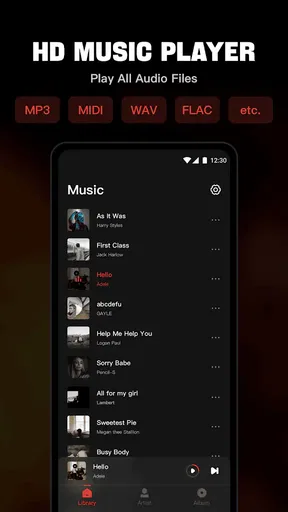
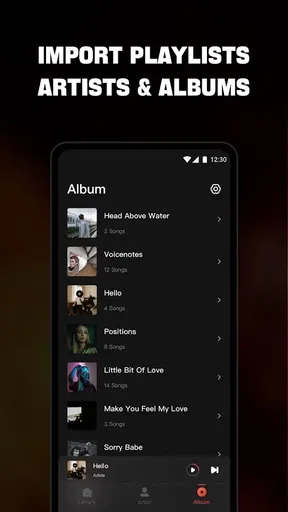
One of the first things I did was import my existing music library. Mixtube supports a range of formats, making it super easy to get all your tracks in one place. The app scanned my device and quickly populated the library. It felt like magic seeing all my favorite songs ready to go without the need for an internet connection.
Creating and Managing Playlists
Creating playlists on Mixtube is as straightforward as it gets. You just hit the "Create Playlist" button, name your playlist, and start adding songs. I loved how easy it was to organize my music just the way I like it. Plus, you can rearrange tracks by simply dragging and dropping them. It’s user-friendly and makes managing your music collection a pleasure rather than a chore.
Enjoying Music Offline
The real gem of Mixtube is, of course, the offline listening feature. Once your music is imported and organized, you can listen to it anywhere, anytime. Whether you're on a plane, deep in the woods, or just conserving data, Mixtube has your back. The playback quality is superb, and I didn’t notice any difference between online and offline listening. It’s seamless and smooth, just like it should be.
Additional Features and Personalization
Mixtube offers a handful of neat features that enhance the listening experience. There’s an equalizer to tweak audio settings to your liking, and the sleep timer is perfect for those who like to fall asleep to music. I also enjoyed customizing the app’s theme; it’s a small touch, but it makes the app feel more personal.
User Experience and Interface
The user experience on Mixtube is top-notch. The app is responsive, and navigation is intuitive. The design is minimalistic, which I appreciate because it keeps the focus on the music. The developers clearly prioritized ease of use, and it shows in every aspect of the app.
Room for Improvement
While I’m a fan of Mixtube, no app is perfect. I did notice that the app could benefit from more advanced features, like smart playlists that adapt to listening habits. Also, while importing music is easy, it would be nice to have the option to sync with cloud services directly.
Overall, Offline Music Player - Mixtube is a fantastic app for anyone looking to enjoy music without the constant need for an internet connection. Whether you’re a casual listener or a music junkie, this app has something to offer. With its user-friendly interface, robust features, and seamless offline playback, Mixtube is definitely worth checking out.
My connectivity verdict
I see Mixtube as a practical choice when locally available music is the part you need to count on and radio or discovery is an occasional extra. Its value is less about replacing every music service and more about giving a prepared library a convenient home alongside other listening options. That balance is useful for commutes, travel and data-conscious days, provided you check your music before you lose a dependable connection.
I would give it a try if you want a straightforward way to organize personal tracks and make offline listening part of your routine. I would skip it if your priority is a deep streaming catalogue or if you have no interest in managing local music. For me, the best approach is to start small, test the exact tracks and situations that matter, and decide whether the blend of local playback and connected choices earns a place on your phone.
Pros
- High-quality audio playback.
- User-friendly interface design.
- No internet required for use.
- Customizable playlists feature.
- Supports various audio formats.
Cons
- Limited free storage space.
- Ads in the free version.
- No cloud syncing option.
- Basic equalizer settings.
- No lyrics display option.
FAQs for Offline Music Player - Mixtube
What features does Offline Music Player - Mixtube offer?
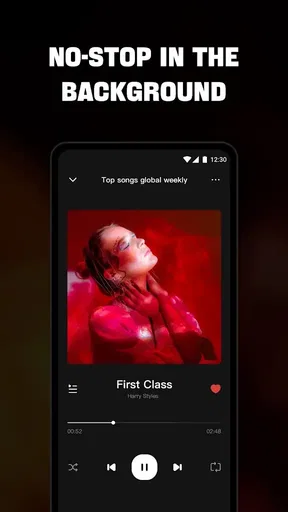
Offline Music Player - Mixtube allows users to download and listen to music offline without any internet connection. It supports various audio formats, provides a customizable equalizer, and offers playlist creation. Additionally, the app features a sleek user interface and background playback, making it convenient for music lovers on the go.
Is Offline Music Player - Mixtube free to use?
Yes, Offline Music Player - Mixtube is free to download and use. However, it may contain in-app purchases or ads that enhance the user experience or offer additional features. Users can choose to purchase a premium version to enjoy an ad-free experience and access to exclusive features.
Does Offline Music Player - Mixtube support playlist management?
Absolutely! Mixtube supports robust playlist management, allowing users to create, edit, and organize playlists effortlessly. You can add songs to existing playlists, reorder tracks, and even share your playlists with friends. This makes it easy to keep your music library organized according to your preferences.
How can I download music for offline listening in Mixtube?
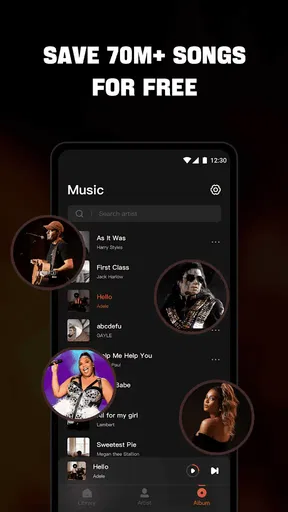
To download music for offline listening, simply search for your desired tracks within the app and look for the download option. Once downloaded, the songs will be available in your offline library, allowing you to enjoy them without an internet connection. Make sure you have enough storage space on your device for downloads.
Is it possible to customize the audio settings in Mixtube?
Yes, Mixtube offers an advanced equalizer with various presets and customizable settings to enhance your listening experience. Users can adjust bass, treble, and other audio parameters to match their preferences. This feature ensures that you can enjoy optimal sound quality tailored to your taste.


